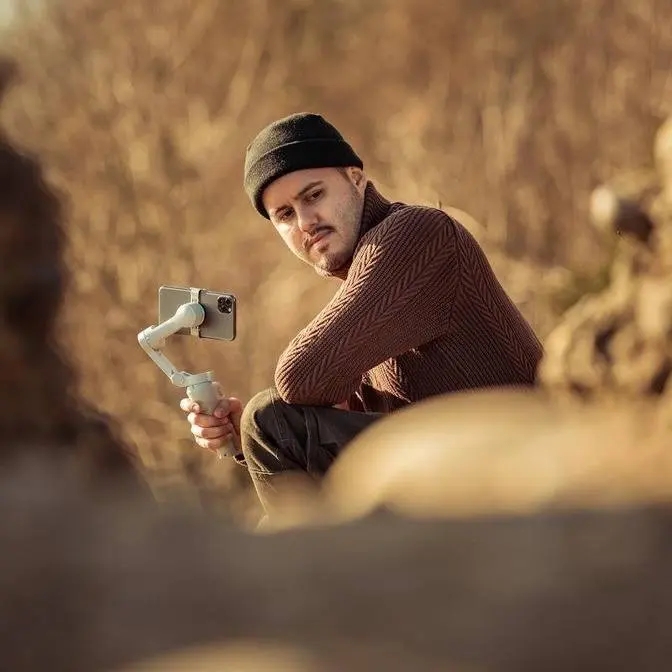
Get ready for the ultimate showdown of foldable mobile gimbals! These are the top contenders of 2025. In this video, I’ll compare the Insta360 Flow 2 Pro, the DJI Osmo Mobile 7P, and the Hohem iSteady V3 to help you decide which is the best fit for your content creation needs.
DISCLAIMER Some links are affiliate links, where I earn a small commission if you click on the link and purchase an item. You are not obligated to do so, but it does help support this YouTube channel and allow me to continue making videos for you. I appreciate your support!
TIMESTAMPS: 00:00 - Introduction 00:54 - Why do you need a mobile gimbal? 01:23 - Size and Weight 03:01 - Build & Design 06:04 - Setup Time 06:53 - Stabilization 07:18 - Range of Motion 07:49 - Gesture and Remote Control 10:03 - Subject Tracking (Dedicated App) 10:49 - Advanced Tracking (Dedicated App) 12:22 - Subject Tracking (Third-Party App) 13:47 - Whooshes 14:03 - Wireless Microphone 16:16 - Fill Light 17:06 - Advanced Tracking (Dedicated App) 17:29 - Battery Life 17:56 - Price 18:45 - Final Thoughts
get ready for the ultimate showdown of
foldable gimbals these are the top
contenders of 2025 each released just a
few months apart in this video guys I'll
be comparing the insta 360 Flo 2 Pro the
DJI osmo mobile 7p and the home I V3 to
help you figure out which is the best
fit for your content creation needs now
I've spent plenty of time using all free
gimbals and have worked with the
companies behind them however this video
is not sponsored by any of them and they
don't get to see this video before you
do this way I can give you my honest
review so you can make the best decision
for yourself now I'll be evaluating each
one based on key factors and I'll leave
time stamps below so that you can skip
or head to a particular part in the
video hopefully by the end of this video
you'll have a clear picture of what the
pros and cons of each of these gimbals
are if you're new to mobile gimbals and
are wondering what they are and why you
might need one here's a quick
explanation a mobile gimbal's main job
is to help you capture smooth shots with
your smartphone and these days most
mobile gimbals do a great job of
stabilizing so it's less about the
steady shots and more about the extra
features they offer features like
subject tracking gesture control and
thirdparty video app compatibility which
makes shooting much more easier and help
you capture more creative shots so let's
start with the size and weight now all
three gimbals are compact foldable and
easy to carry now among them I find the
I steady V3 to be the most pocket
friendly thanks to its inward folding
clamp now when it comes to weight the
flow 2 Pro is the lightest at
357 G followed by the om7 P at 368 G and
finally the iedi V3 at
420 G now there are also other options
available out there such as the zione
smooth 5S AI or the horm I steady M7 but
I didn't include them in in this review
because they are heavier and not
foldable and are more meant to be used
for heavier payloads now all three
gimbals can handle phones with payload
of up to 300 G the iPhone 16 Pro Max
weighs 227 G and when adding the case
which is around 40 G you get a total of
267 G leaving enough room to throw also
a small VN filter so you can see it
works with the inser 360 flow 2 Pro no
problem and now we have the DJI osmo
mobile 7p which you can see works as
well and we have the home iady
V3 now if you go over the limit of 300 G
like when attaching a thirdparty lens
you're out of luck because none of them
support counterweights to balance the
extra loads for third party lenses like
these it's best to use something like
the home I City M7 which supports a Max
payload of 500 G which in this case
would be the better choice now when it
comes to the built and design they all
feel high quality with an ergonomic grip
for comfortable shooting they also all
feature a 1/42 hole at the bottom for
attaching to a tripod or other
accessories now all three gimbals
feature integrated tripod legs but each
has its own qualities now the integrated
tripod on the DJI is by far the easiest
and quickest to set up however its legs
is less stable than the other gimbals
now the others feature longer and
thinner legs that offer better stability
now with the flo 2 Pro you can also use
the legs as an extension handle while on
the home for example it's less ideal now
all gimbals feature an extension pull to
capture creative shots the buttons on
all gimbals are intuitively designed
offering just a few controls for quick
and easy access to various functions now
I find the DJI and the hems buttons
simpler to use overall while the flo2
pro has a sleek and modern design its
limited numbers of buttons makes it a
bit harder to navigate I like that the
DJI and home have a status panel to
better see what gimbal mode you're in
which on the insta 360 is a bit more
challenging now I find the joystick on
the DJI to be the most responsive and
easiest to use to controlling movements
with hormes joystick coming in as second
the insa 360 for me however feels a less
precise now when it comes to mounting
the insa 360 and the DJI use a magnetic
clamp for quick setup and easy
Detachment while the home comes with a
built-in clamp now while it does take
longer to set up your phone using the
built-in clamp it offers however a more
secure amount and minimizes the risk of
misplacing it now with the DJI gimbal I
often have to double check the alignment
when attaching the clamp as it's easier
to misalign the inser 360 however feels
easier and more reliable to align thanks
to with slightly different design now
insta 360 and DJI also include these
magnetic foam mounts which are
compatible with macafe providing a fast
convenient mounting option that can even
double as a stand so I can attach this
to my Max safe case and then simply pull
this part out and I can use it as a
stand which is pretty cool and same goes
for the
DJI now one downside of using the
magnetic Mount from DJI is that you
can't attach the multifunctional module
which includes the intelligent tracking
however Ina 360's AI tracker is mounted
directly to the gimbal motor so it works
seamlessly no matter which clamp you use
now personally I like to use the
magnetic phone mount over both the
magnetic clamp and the built-in clamp
because I can just simply snap it on and
it doesn't interfere with any of the
buttons up here and also speeds up the
setup process and helps me Capture
Moments faster you can see I can just
mount it unfold it and I'm ready to go
now when it comes to the setup time the
insta 360 takes the win both the DJI and
insta 360 use a magnetic mounting system
with a quick one-step startup process
however when I timed them both from
unfolding the gimbal to being ready to
shoot the flo2 pro was faster and
smoother however folding the gimbal back
is easier with the DJI on the other hand
the home adds an extra step requiring
you to mount your phone into the clamp
and powering it on each time now a
standout perk of the insta 360 is the
dedicated to backpack mount for the flo2
Pro making setup even quicker while
freeing up your pockets for other
Essentials for me quick setup time is
Key to capturing moments on the Fly and
the insta 360 in this case truly excels
in this area now in terms of
stabilization I find that all three
gimbals provide excellent stabilization
now I've tested them while walking and
running so that you can see the
difference for
[Music]
yourself now when it comes to range of
motion the insta 360 is leading the pack
the flo2 pro offers infinite pan
tracking making it a breeze to capture
your surroundings especially when
tracking yourself in contrast both the
DJ GI and home hit their limits another
standout feature of the insta 360 gimbal
is its free tilt mode which provides
unlimited tilt range this mode makes
complex shots like crane shots
incredibly simple with the DJI and home
you need to hold the gimbal sideways to
achieve the same results Which is far
less convenient now all three gimbals
offer guesture control allowing you to
start tracking and recording with simple
hand guestures so you don't necessarily
need to use the buttons this feature
Works seamlessly with their dedicated
apps and with their physical tracking
module you can even use guest your
control across various thirdparty apps
and this is especially useful when
filming yourself with the rear camera
not the selfie camera because it
provides the highest quality of all the
lenses and even if you can't see
yourself the tracker ensures you're
always perfectly centered in the frame
and with all three gimbals you can also
customize your composition for different
framing options now home has an added
guesture that lets you quickly switch
orientation seamlessly making it
convenient if you film in both portrait
and landscape formats with the insa 360
and DJ gimbals you'd have to do this
manually now insa 360 has a standout
feature if you look over here it has a
unique selfie mirror which you won't
find on the other gimbals it's perfect
if you need to frame yourself or do a
quick touchup with its clear wide view
you can simply align your head on the
top top of the mirror and you're
centered in the shot now the home I
steady V3 sets itself apart with the
removable control letting you operate
the gimbal from up to 10 m away the
downside to it is if you lose this
remote control the gimbal loses its
controls on the other hand the Ina 360
and DJI gimbals don't have detachable
remotes but you can control it via the
Apple watch you can adjust the direction
enable tracking recenter the Gimbal and
even get live preview which is perfect
for framing yourself I did notice though
that the DJI had a more stable
connection while the inset 360
experienced occasional lags now one of
the coolest feature of the flow 2 Pro is
the ability to connect a second phone
via the insta 360 app simply by scanning
a QR code with another phone which is
compatible with both IOS and Android and
you won't even need to download the app
on the second device it then opens up in
a browser letting you remotely control
the gimb and this is an awesome
alternative if you don't have an Apple
Watch okay so let's test out the subject
tracking on all three gimbals starting
with their dedicated apps and by the way
all three gimbals also support object
and animal tracking throughout their
dedicated gimbal apps the home I City V3
was very responsive and tracked me
accurately even when I wasn't facing
directly the camera it did a great job
of following me when I hid behind a tree
and then reappeared the DJI ulo mobile
7p also delivered great tracking
performance it followed my movement even
when I wasn't facing the camera and when
I hid behind a tree the gimbal quickly
picked me up again the insta 360 Flo 2
Pro performed similarly well it tracked
me accurately even when I wasn't looking
at the camera and quickly resumed
tracking when I reappeared from behind
the tree the insta 360 app offers some
great extended tracking features such as
active Zoom tracking auto zoom tracking
a proframe grid and multi-person
tracking and these features you can find
within the accompanied gimbal app on the
insta 360s and you won't find these
features on the DJI and home so let me
quickly walk you through each of them
with active Zoom tracking the camera
locks in and accurately follows the
subject from a distance offering up to
15x zoom in comparison to the DJI om7
and the home lack Zoom tracking however
both can zoom but the DJI is limited to
eight times while the home matches the
15x Zoom capability then there's auto
zoom tracking for more flexible shooting
you can activate auto zoom to
automatically adjust the zoom levels
based on the subject's distance then
there's the proframe grid where you can
tap on any grid Square to set your
composition this means you're not stuck
always being in the center this way you
can create a more interesting shot by
selecting one of the nine composition
points while the camera tracks you
lastly there's multi-person tracking
that allows you to track multiple people
in a shop and this feature also balances
the shot by treating everyone as a
single group and centering them on the
screen Additionally you can choose a
primary subject to keep as the main
focus of the shot now dji's smart
capture also offers multi-person
tracking allowing you to select a
primary subject to track within the
frame however it does not balance the
composition when recording a group of
people next let's set the tracking
feature on each gimbal using their
tracking modules to see how they perform
with the default camera app the home
iady V3 tracked me well when I was close
to the camera but as soon as I was about
5 to 6 M away the tracker started to
lose me so it seemed to struggle to
maintain tracking at longer
distances the DJI osmo mobile 7p
performed well at close range and still
tracked me accurately even when I was
about 10 m away including when I hid
behind a tree and
reappeared the insert 360 float Pro
followed me accurately both up close and
further away similar to the DJI osmo
mobile 7p it also managed to redetect me
and continue tracking after I hid behind
the tree and reappeared now the insta
360 Flo 2 Pro comes with the Apple Dock
kit making it the only gimbal with this
feature it's specifically designed for
Apple devices and enables tracking
functionality with over 2003p party iOS
apps although the tracking speed is
slightly slower than the insa 360 app or
the track tracking module it still
delivers accurate results one of the
best parts about the Apple doc kit
Beyond native iOS tracking is the
ability to control Advanced Camera
functions directly through the gimbal
Smart Wheel this works seamlessly with
the iPhone's camera app and Pro apps
like the Blackmagic camera unlocking
features like Zoom control and smooth
front to rear camera switching which is
pretty cool and I really wished that DJI
and hem wouldn't limit themselves to
just start and stop recording and
instead offer extended functionality for
Advanced Camera controls when it comes
to wireless microphones dji's Vlog combo
stands out by including the DJI mik mini
transmitter which pairs seamlessly with
the multi-functional module to deliver
crystal clear wireless audio so I now
have the DJI mik mini connected to the
multi-functional module on the DJI osmo
mobile 7p and this is how the audio
quality sounds like the great part about
using a wireless mic is that I can walk
around without needing any cables and
capture high quality audio so right now
I have the DJI mik mini connected to the
iPhone 16 Pro Max via bluetoo and this
is how the audio quality sounds like
definitely not as good as when
connecting it to the multi-functional
module but still I can walk around
freely without needing any cables and it
will still capture decent audio so right
now I'm using the internal mic on my
iPhone 16 Pro Max which sounds okay when
you're close to the camera but as soon
as I walk further away from the
camera my voice gets more quiet and you
probably won't hear me that clear unlike
the insta 360 and the home which require
purchasing a receiver and transmitter
DJI offers a complete wireless solution
Straight Out of the Box unfortunately
the DJI Mike 2 can't be connected to the
multi-functional module at the moment
however I could imagine that with a
future update this could be fixed as the
module supports the DJI osmo audio
ecosystem now in the meantime you can
still use the receiver on the DJI mik 2
or on the DJI mik mini if you want to
use it with the flo 2 Pro you can just
simply connect the receiver and you'll
see it works flawlessly and you can see
it also works with the horm gimbal as
well as with the DJI actually horm also
offers a vlog bundle that includes their
wireless system which is also a solid
option however with the osmo mobile 7p
you can skip the step of using a
receiver and connect the transmitter
directly to the multi-functional module
for convenience now all three gimbals
feature a built-in fill light to help
you shoot in low light conditions you
can adjust both the brightness and color
temperature to suit your environment the
DJI provides a more precise lighting
control with four brightness levels and
four color temperatures through the
module while the insta 360 and the home
offer three brightness levels and three
color temperatures so let's test out the
quality of each light so I'm using the
DJI osmo mobile 7p and this is
brightness level 1 2 3 4 and now the
color temperature 1 2 3 and four so I'm
using the flo 2 Pro and this is
brightness level one two three and here
are the three color temperatures 1 2 and
three so now I'm using the home I steady
V3 and I can actually use it with the
dial which gives me more precise control
over my lighting and this is also
available with the DJI using the zoom
wheel so this is the lowest brightness
and when I scroll all the way up this is
the brightest part let's now change
color temperature number one
two and three all three gimbals come
with a rechargeable battery the flo2 pro
fully charges in 2 hours while the DJI
and home take 2.5 hours regarding the
battery life the home stands out with an
impressive 13 hours while the DJI and
the insa 360 offer 10 hours however the
DJI and insa 360 gimbals have the added
benefit of charging your phone a feature
the home doesn't provide in terms of
price all three gimbals are priced under
200 $0000 the insta 360 Flo 2 Pro is the
priciest at
$179 for the AI tracking bundle which
includes the AI tracking module for a
more budget friendly option you can get
it without the AI tracking module for
$159 next is the DJI osmo mobile 7p
priced at
$149 with the tracking module for an
even cheaper alternative there is the
DJI osmo mobile 7 which cost $8 9 but
excludes the integrated extension pole
and tracking module you can however
upgrade by adding the multi-functional
module for
$48 lastly the home IET V3 is available
at
$129 overall all three gimbals offer
great features and functionality for
creators and vloggers whether you're
using iOS or Android but which one
should you go for that's the big
question it really comes down to your
specific needs budget and preference for
instance if you already own the DJI Mike
mini the DJI osmo mobile 7p would be the
better choice since it's fully
compatible with the multi-functional
module now if you asked me which one I'd
pick uh it would be a close call between
the insta 360 and the DJI since they are
both so similar I can't decide it's too
hard no for me it's clear that the insta
360 flo2 pro edges out as the winner and
here's why it feels more futureproof all
three gimbals offer great tracking but
the insta 360 app stands out with its
Advanced tracking options and extra
features for example you can record in
prores log using their dedicated gimbal
app something the others don't offer yet
plus the free teleprompter feature is a
game changer for someone like me who
relies on scripts I do wish it had a
voice recognition to Autos scroll but
even without it it's still super handy
and then there's the Apple Dock kit
while it's slightly slower than the main
tracking module it's a nice bonus to
have especially with the ability of
Advanced Camera control I also love the
free tilt mode it makes crane shots so
much easier and when you combine it with
the tracking feature you can pull off
some seriously Dynamic shots another
thing that I noticed is that the
recording indicator works with
thirdparty apps as well so in other
words with the indicator it will show me
when the recording has started and
stopped which is super useful when
filming with the rear camera DJI
indicator works perfectly with their
dedicated DJI mimo app but not with
thirdparty apps like the default camera
app which can be frustrating since I'd
have to double check if I'm actually
recording that said the flo to Pro
provides more tools that perfectly align
with my needs as a content creator the
home I steady V3 is a great budget
friendly option for anyone needing a
gimbal with an AI tracking plus if you
don't own an Apple Watch and need a
detachable remote control for greater
control over your gimbal then this is a
great alternative so those are my
thoughts now I want to hear from you
which one of these gimbals would you
pick let me know in the comments below
if you're curious to learn more about
each gimbal I've linked them in the
video description below and if you're
interested in mastering a smartphone
film making check out my course it
covers everything from planning to
filming to editing and Publishing your
final video all from your smartphone
I've linked that below as well thank you
so much for watching guys and I'll see
you in the next one
[Music]
[Applause]
[Music]
[Applause]
[Music]
[Applause]
[Music]