

Welcome to Gan Jing Campus, a new way to teach, connect, and inspire within a safe, values-driven digital environment.
This free course is designed especially for educators who have received a Teacher Premium Channel — your ad-free, educator-friendly teaching space powered by Ethical AI.
By completing this short course, you’ll not only master how to set up your channel, create engaging multimedia lessons, and curate quality content — you’ll also qualify to become a Gan Jing Campus Certified Digital Educator (CDE) —earning recognition for your innovation, kindness, and impact in online learning.
If you haven’t already, apply for your free Teacher Premium Channel today! 👉 Apply Now
Learning objectives
By the end of this course, you’ll be able to understand what the Gan Jing Campus Teacher Premium Channel is and how it helps you teach more safely and effectively.
Course topics:
- Set up your Channel
- Create and share content in any format — videos, shorts, articles, posts, or polls — all in one place.
- Curate learning materials using unlimited Collections to build organized lesson playlists.
- Find free resources and tools: Music Library & Multi-language Auto Captions
- Engage your classroom with custom Owner Hashtags for projects, challenges, and events; and join Gan Jing Campus official events.
- Feature content and sections on your Channel Home — your easy, all-in-one mini website to organize lessons, share resources, and connect with students.
- Advanced features: teach live using live streaming with auto-captions, and start your private Groups.
- Explore the Gan Jing Campus Certified Digital Educator (CDE) Program to grow your skills and gain recognition.
You don’t need to be tech-savvy or have hours of free time — each step is quick, practical, and designed to make your teaching life easier.


Download the Gan Jing World app to access your Teacher Premium Channel from your phone:

New to Gan Jing World? Click the top-right icon to sign up—it only takes a minute.

1. Set Up Your Channel
i. Go to My Channel — Sign in to Gan Jing World, then click your channel icon in the top-right corner to open My Channel.

ii. Customize your channel — You can customize your channel name, description, banner, and icon.

iii. Create message boards — You can also post your first welcome message on your Channel Home message boards (You can pin up to three boards at the top of your channel).
- Welcome students and parents to your class community.
- Update class news, schedules, events, and more
- Include a quick note like “check here for weekly assignments and reminders.”
- Add a positive quote or class motto (e.g., “Be kind. Be curious. Keep learning.”)

2. Create content - posts, articles, polls, shorts & videos
Now it’s time to start creating! Share your ideas and lessons through posts, articles, polls, shorts, or videos — all from your Teacher Premium Channel.
i. Create a Post
Share quick updates, reminders, or classroom announcements with your students. Add personality by choosing a beautiful background for your post.


ii. Create a Poll
Running classroom polls & quizzes is easier than ever. Start by clicking Create, then select Poll. Write your question, add a few answer options, and choose a feature image to make it stand out.


iii. Create a Short Video
Upload a video directly from your phone, or record a short clip right in the app. You can add filters, effects, and soundtracks before posting. Short videos are a quick, engaging way to introduce a topic, share class highlights, or give students bite-sized learning tips.


iv. Write Articles (desktop only)
Create and share longer written pieces such as lesson guides, reflections, study notes, or educational stories. You can also showcase student essays or class projects to celebrate their learning. Add images, links, and formatted text to make your article more engaging and easy to read.


v. Upload a video
To upload a long-form video, go to Creator Studio. On the top bar, click Create Content, then drag and drop your video file to upload.
Long-form videos are perfect for full lessons, demonstrations, flipped-classroom recordings, or professional development content you’d like to share with other educators.

3. Curate Content
Easily curate learning materials using unlimited Collections to build organized lesson playlists that keep your classroom resources in one place.
Use case:
Homeschool teacher Adele Mansilla uses Gan Jing World to curate unlimited Collections across subjects — from Nature and History to Music Education, Health, and Science.

How to create your first Collection:
i. When you find a video, short, or article you like, click the Save button.
ii. Choose to create a new Collection or add the content to an existing one.

iii. Access all your curated Collections under your channel’s Collections tab. You can also display Collections directly on your Channel Home for easy access.

Tip: Use Collections to group resources by topic, grade level, or unit — it’s a simple way to turn your channel into a digital learning library.
Discover More Teaching Resources:
Gan Jing World offers a unique library-style browsing experience, making it easy for teachers to find endless educational resources based on their subjects, interests, and teaching goals. Learn more about the redesigned interface here:👉 Gan Jing World’s New Library Experience

4. Free Resources and Multi-language Tools
4.1 Free Music Library to Enhance Your Content
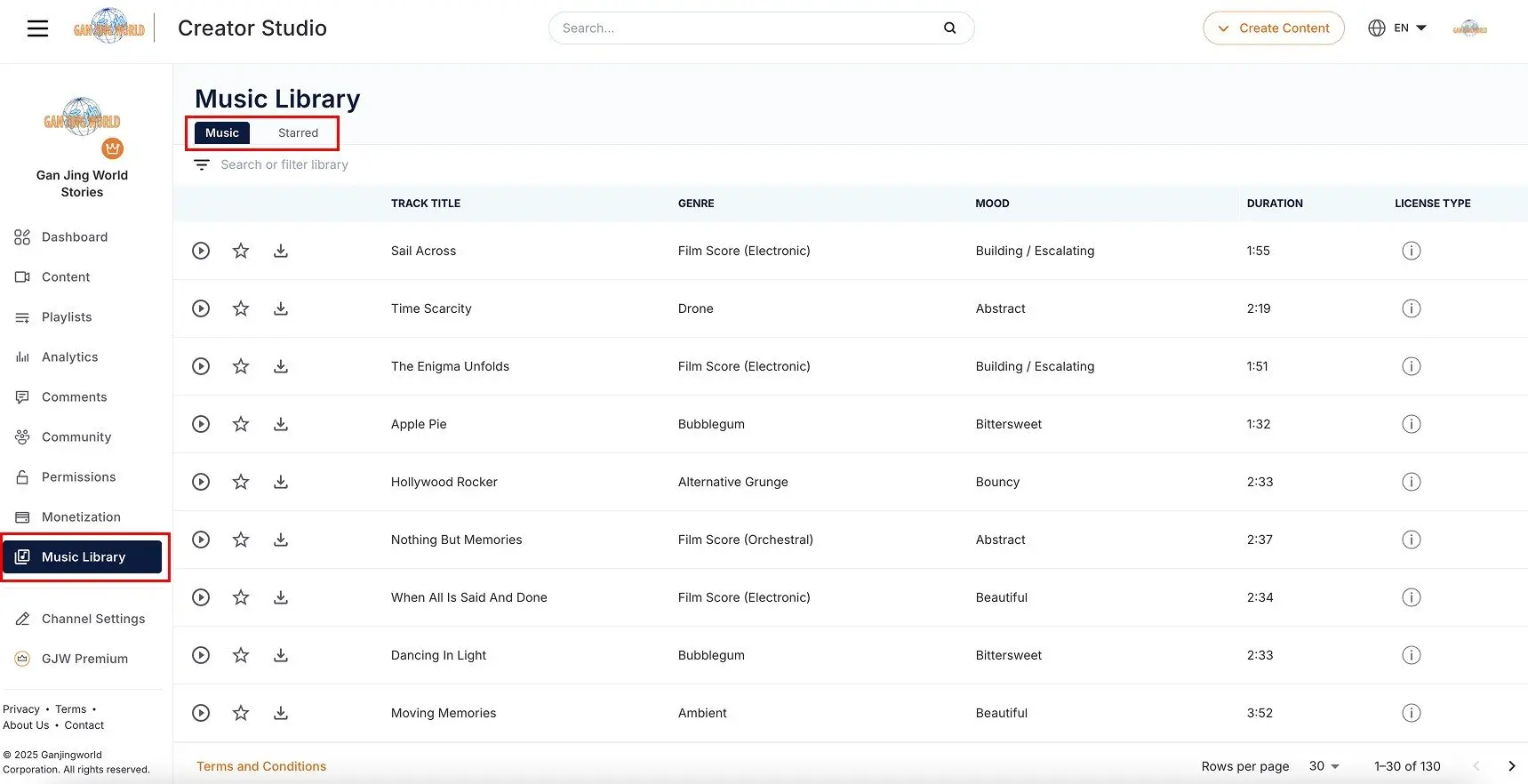
Gan Jing World’s new Free Music Library lets you add high-quality, royalty-free soundtracks to your videos—safe, simple, and perfect for classroom creativity.

Go to your Creator Studio, select the "Music Library" tab in the left column and begin to browse available music resources. Click the "Download" button to download your favorite tracks and use them in your content creation and video editing.
4.2 Generate Multi-language Auto-captions for Your Videos
You can use Multi-language auto-translation and captions to make your videos accessible in 11 languages — helping students and parents from diverse backgrounds understand your lessons with ease.
To learn how to enable this feature step-by-step, visit the Detailed Tutorial on Multi-language Captions.

5. Register Your Unique Owner Hashtags; Host, Manage & Join #Events
Gan Jing World offers a unique feature not found on any other social platform — Owner Hashtags. Each Teacher Premium Channel includes three unique Owner Hashtags, a paid feature that is completely free for verified teachers.
These exclusive hashtags are registered to your Teacher Channel, giving you a simple, powerful way to organize, manage, and inspire classroom engagement.
With your two custom Owner Hashtags, you can:
- Host classroom projects and challenges (e.g.,#ABCSchoolScienceFair, #ABCSchoolKindnessWeek)
- Organize student submissions and creative showcases under one tag
- Run interactive class events or school-wide campaigns
- Join official Gan Jing Campus #Events to connect with educators worldwide
5.1 Register Your Unique Hashtags
i. Once your Teacher Premium Channel is approved, a Hashtag tab will appear on your channel. Go there to register your own unique hashtags.

ii. After your unique hashtag is approved, it will show up in your Hashtag tab.

iii. You can also feature it on your Channel Home so students can join easily. We’ll cover how to do this in Section 8 below.

5.2 Invite Others to Join & Share Your Hashtag Events
Once your hashtag is live, you can share your hashtag, hashtag page url or QR code to invite students, parents, and fellow teachers to join your hashtag events. Encouraging others to participate helps build a sense of community, showcase creativity, and keep your classroom activities visible and engaging.

Example: Ms. Chen’s #ReadingWeekChallenge
Goal: Build daily reading habits and share book love
Who joins: Students, parents, other classes
What students do: Post a photo or 10-sec short + 1 sentence: “Today I read ___ because ___.”
Tag #ReadingWeekChallenge + #MsChenGrade5
5.3 Easily Manage Your Hashtag Event


Use Case:
Leejun Taylor, a high school teacher in New York, uses Gan Jing World’s Teacher Premium Channel to run a custom class hashtag — #LiLaoShi — that gathers videos, photos, posts, and notes into one clean, organized gallery, making it easy to manage and enrich classroom interaction.

6. Turn Your Channel Home into Your Mini-website
Now that you’ve created content, you can organize and feature it into sections, turning your Gan Jing World Channel Home into an interactive mini-website for your classroom.
Your Channel Home lets you:
- Showcase multimedia content, collections, polls, and events in one place.
- Keep students and parents organized and engaged.
- Highlight your best content — videos, collections, articles, or hashtag events.


i. Go to Creator Studio → Channel Settings → Layout to add and manage your channel sections (you can have up to 24). Drag to rearrange them, and don’t forget to save your changes.

ii. Click the three dots next to each section to customize its content.

7. Advanced Features
Ready to take your teaching to the next level?
Here are a few advanced features you can explore — each with a step-by-step tutorial to help you get started.
7.1 Create a Private Group
Use the Groups feature to create a private, secure space for your class or parent community. It’s perfect for sharing updates, lesson materials, homework reminders, and exclusive classroom discussions — all within a safe, ad-free environment.
👉 Learn how to create a Group (Tutorial)

7.2 Go Live with Livestreaming
Use Live-streaming to host real-time lessons, Q&A sessions, or school events directly from your Teacher Premium Channel. It helps you connect with students instantly, build engagement, and create interactive learning moments from anywhere.
Your Teacher Premium Channel also comes equipped with in-language live captions — a powerful accessibility feature not available on regular channels — making your live sessions more inclusive and easier for all students to follow.
👉 Learn how to start a Live-stream (Tutorial)
8. Get Certified — it looks great on you and your teaching journey.
Grow your digital teaching skills and become a certified expert in Gan Jing Campus teaching tools for the classroom.
You’ve already built the skills — now it’s time to make it official!
By completing this course, you’re ready to earn your Gan Jing Campus Certified Digital Educator (CDE) badge and certificate.
Add it to your resume, portfolio, or website to showcase your growth as a safe, values-driven, and innovative educator.
Benefits for teachers:
- Enhance your resume and professional credibility with a certificate and badge
- Receive another year of teacher sponsorship package (value $1,588)
- Increase visibility: Get your channel and curated content featured on Gan Jing Campus
- Join a network of educators committed to values, kindness, and educational impact
- Gain public recognition through an online / offline award ceremony
How to Get Certified
- Complete all required items listed below.
- Fill out the Certification Form and answer a short quiz to confirm your learning.
- Pass the review, and you’ll receive your official CDE Certificate and Badge by email.
- Subscribe to the Gan Jing Campus Official Channel to stay updated with news, events, and training opportunities.
| Item | Detail / Threshold |
|---|---|
| Create Educational Content | Upload 3 long-form videos (horizontal) or short-form videos (vertical), or 5 articles to your channel. Your topics can include science, mathematics, languages, social studies, arts, moral education, teaching reflections, or any insightful educational experience you’d like to share. |
| Curate Learning Resources | Create 1 or more Collections of educational materials (lessons, resources, reading sets, etc.) |
| Event & Community Leadership | Register 1 Owner Hashtag with your channel to host an online event, achieving 10+ submissions/posts. |
| Develop Your Digital Teaching Space | Have at least 5 content sections on your channel home page. |
Comments