

In today's digital age, creating engaging video content has become a crucial skill for content creators and aspiring media professionals. Whether you're a seasoned content creator or just starting your journey, mastering video editing tools is essential to stand out in the crowded online landscape. In this tutorial, I'll take you through the process of harnessing the power of Canva and DaVinci Resolve to elevate your video editing skills to the next level. Let's dive in!
This is a sample video showcasing my tutorial on how to utilize multiple video editing apps and AI tools to produce creative video content like the one you see here.

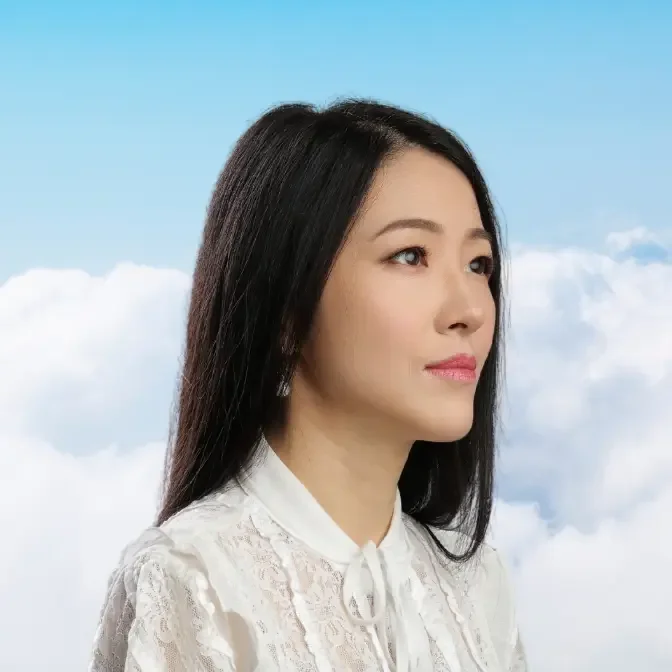
With numerous ancient myths and prophecies suggesting that we, the denizens of today's world, have undergone countless cycles of reincarnation, it begs the question: what have we encountered during these eternal repetitions? What awaits us within this unending cycle? Is there a path to transcend the boundaries of life and death, to break free from the ceaseless wheel of reincarnation? My hope is that every friend on this journey can uncover their own answers in this lifetime.
Through creative video editing, like the one you just witnessed, we can introduce ourselves to the community in a truly remarkable way.
Lensa AI Magic Avatar
I employed Lensa to create my AI-powered magic avatar. Interestingly, Lensa can also serve as a photo editing tool. You can refer to the guide titled "Lensa AI App: A Step-By-Step Guide to Magic Avatars (2023)" to discover how to craft your own avatars for content creation. This offers a highly creative means to introduce yourself to your community and express your identity.
Canva Video Editing
Then I utilized Canva video templates to create my initial video draft. If you're unfamiliar with using Canva, please refer to the guide titled "GJW Tutorial: Learn Professional Video Editing In Just 30 Minutes." Canva offers an incredibly user-friendly interface along with a vast library of royalty-free resources, including music, images, videos, audio, graphics, and more. In my opinion, it's a crucial tool to master if you aim to maintain a professional channel.
To start, I searched for Canva's free royalty footage to craft the opening section featuring the Greek map.

Additionally, I discovered footage of a goddess statue surrounded by clouds, which I used for my video's title. I divided the goddess footage into four segments: the first part was left empty, the second part contained the main headline "Incarnation," the third part featured the subheading "in Ancient Greek," and the last part included "@Ariel Tian Tian 雲起時分" as the credit. This allowed me to control the order of the headlines and their animations, ensuring they didn't all appear simultaneously, resulting in a more visually pleasing effect.
Music from Pixabay
I searched using keywords like "ancient Greece," "Greek," "ancient cinematic," etc., and finally, I found "Forgotten Ruins" as the perfect background music. Its harp resonates with the Greek music style, and its theme and emotions connect with the audience.

Additionally, you can also consider using royalty-free music from Pixabay. "Daddy_s_Music" is one of my favorite composers because his style can cater to almost all your musical needs. His pieces convey a f, elegant inner world with dignity, which is what I appreciate the most.
Photo Collage Footage
I utilized the "Beige Scrapbook Happy Wedding Anniversary Video" template for my photo collage footage, and I transformed all the graphic elements into ancient Greek elements using Canva's royalty-free graphic library. The result turned out quite impressive!

End with Social Card
I applied Turquoise and White Quotation for Mental Health 16:9 Video template as my social card at the end of my video with a significant Subscribe button on the screen. This call for action element is very important to make people follow and subscribe after they finish this video.

DaVinci Resolve
Canva began to freeze when I incorporated numerous animations, transitions, and video clips. I encountered challenges aligning the video with the audio due to the sluggish performance, which eventually left me frustrated. As a result, I decided to download everything and continue editing in DaVinci Resolve to complete the project.

Please watch the comprehensive tutorial for beginners on DaVinci Resolve and practice. This is the best tutorial I found so far. Trust me, it's not rocket science to if you want to master video editing skills on DaVinci Resolve which is use for a lot of Hollywood productions. And the app is FREE!
In my personal opinion, leveraging Canva's templates and the advanced features of DaVinci Resolve is the optimal approach if you aim to elevate the quality of your videos for your channel.
Other Recommended Reading:
- GJW Tutorial: How to Achieve 100+ Subs and 1000+ Views In 4 Days
- From Doubt To Destiny: Embracing Success In Ganjing World
These are the recommended articles for further reading, and you can click on the titles to access them directly.
Thank you for joining me in this creative video editing journey! If you found this tutorial helpful and want to see more exciting content, don't forget to subscribe to my channel. Stay tuned for more tutorials and tips on creating captivating videos using various editing tools. Remember, with a little creativity and the right tools, you can bring your video content to the next level. If you have any questions or suggestions, feel free to leave them in the comments section below. Let's keep learning and creating together!
Comments