
UX Design: How To Get Started (A Full Guide)
1 Video View·Oct 25, 2024
in this video I'm gonna share with you
six simple steps for how to get started
in UX design and I'm going to tell you
how I started my journey until I got a
job and the lessons I learned from it so
that you can avoid making the same
mistakes so let's get started
[Music]
follow these six steps I guarantee you
you will get a job and how do I know
that because that's what I did over a
longer period of time and it got me a
job where I'm working right now hi my
name is amar and I'm a self-taught UX
designer working at a design agency
called Ajay and smart and I wanted to
make this video because I wish it
existed when I was first starting out so
I didn't study UX design in university
but I loved design and technology and
when I found out that there was this
thing called UX design I was immediately
hooked so I made this video to like
really condense down the steps to the
essentials for you to get started to
make sure that you have all you need to
go from a beginner to someone who can
actually get a job in UX design as
you're watching this video if you have
any questions about any part of what I'm
talking about make sure to let me know
in the comments and I'll make sure to
get back to you
also if you have any tips that I forgot
to mention please make make sure to put
them in it'll be useful to me and anyone
else watching this video in the future
by the way if you're interested in
videos like this make sure to subscribe
and hit the bell icon to get notified
every time we put out a video we do
videos like this every week so let's
dive into step one which is deciding
whether UX design is for you so I'm
assuming if you're watching this video
you already know a little bit about what
UX design is but you might not know if
it's actually the thing for you you
don't know if you're gonna enjoy this
and I picked a really useful resource
for you to be able to do that so there's
this website called career foundry and
they offer UX design programs but they
also have this very nice and short
emailed course it's a 6 day course
if you put in your name and your email
you don't have to pay anything and
they'll basically send you a series of
introduction email about UX design to
help you decide whether this is the
thing that you want to be doing as your
job by the way everything I mentioned in
this video is going to be linked in the
description so you can check it out you
can keep referring back to it as you go
through these steps the other thing you
can do to decide whether UX design is
for you is to actually talk to someone
who has a job that you want to be doing
so in this case you go and find a UX
designer whether it's a friend or a
friend of a friend just talk to them
about what their job is like what they
enjoy about it when they don't enjoy
about it and that'll give you a
much more solid idea of what the day to
day job is like and not just the
highlights or what's great about it so
that's also a really good thing for you
to try alright so step two is to take a
course to learn the principles now this
is really important because a lot of
people when they want to learn about UX
designs start watching random tutorials
here and there and have the feeling that
they're making progress but when you're
learning in such a scattershot way you
never have anything concrete that you
can say that you've mastered and that's
why it's really important for you to go
through a structured curriculum and I
picked out two really good courses for
you to try and I'm going to show them to
you right here so the first one is the
introduction to user experience design
this is a course by Coursera and it's
free for you to take and you only need
to pay to get the certificate which is
not something that's that important in
my opinion and this course has gone a
ton of really good reviews and the
syllabus is also really good it's not
too long it's five weeks long and it
gives you all the basics that you need
if you don't know a lot about UX design
it has a really good overview in the
beginning at just takes one hour and
then it takes you through the steps that
you need to know like how do you gather
requirements for a design and then how
do you start thinking about alternatives
and then prototyping and then you final
step is to evaluate your design so this
is a really good course to go through
and is completely free
another option is from Accenture and
it's called digital skills user
experience this is also a really good
course I just put it as an alternative
here because sometimes some people
respond to some course is better than
others so you have a choice between
these two but I narrowed it down
intentionally so that you don't have to
choose between multiple things and spend
a lot of time choosing instead of
actually learning and doing so just
start with this course the Coursera one
and if you don't like it move on to the
next one it's really not that important
which one you choose as long as you
actually go through it and finish it and
like I said both of these courses are
completely free but there's also a third
ops
that I want to show you which is really
mostly useful for people in Germany and
it's from career family career family
has a really good boot camp a long boot
camp I think it's around six months or
something like that but it's also quite
pricey but if you're someone who's
living in Germany and you're unemployed
if you're making a career change you can
actually get this course for free and
we'll have a link in the description for
how you can do that if you are someone
who living and who's living in Germany
and you don't have a job right now and
once you finish the course now you're
ready to start practicing on your own
and start mastering a design tool now
for this I also picked out two tools for
you
one is figma and it has a very generous
free plan you can be working on it using
all the features completely for free and
it has some collaboration features so
that if you're working with someone
you're able to work on the same design
file at the same time kind of like
working in a Google Doc figma is a great
option this is what we use at agent and
smart we're designing apps pretty much
every week and it's a very very good
tool another option is from Adobe if you
already have some Adobe apps
it's called Adobe XD and it also has a
generous free plan that you can go with
figma is based in the browser so no
matter which computer you have like a
Mac or a PC or a Linux it'll work on
everything same thing for Adobe XD so
these tools are both free and they're
available no matter which computer
you're using I'm also going to include a
link to a quick tutorial for figma this
is a short tutorial that will show you
all you need to know just to get started
and with the principles that you have
from the course you'll be able to apply
them while designing something an app or
a website in figma alright step number
four now this is the most important step
which is practice this is where a lot of
people actually stop most people are
happy to do kind of the passive learning
kickback watch some videos or read some
articles you feel good about yourself
but you're not actually learning until
you start practicing the easiest way to
get started is to take something that's
already out there and redesign it or we
create a design that you like inside
something like figma because when you
take a good
design and you draw out the design
pixel-by-pixel again you start to like
absorb why these decisions were made
what's a good layout good typography
good spacing you'll learn that by
copying a good design another thing you
can do is take an app that you think is
really bad so maybe you're using an app
for your bank and that is that that was
really bad you know that you don't like
it your friends don't like it so what
you can do is take all the principles
that you learned in the course which
include gather gathering user
requirements and just doing some
research and then designing a new
solution and then testing it out with
people to see how much of an improvement
at me right and then after you've done
that you should write about that and put
it out there and get feedback on it so
that's what practice means it's really
going through a whole cycle applying all
the principles that you learned and
that's really I can't stress this enough
this is the most important step and this
is the step that most people skip out on
like they watch a few tutorials and then
they call themselves a designer it
really doesn't work that way you have to
put in the hard work and you have to put
up with the feeling that you know that
you're not good enough in the beginning
but you know in your mind what like a
good design looks like and you want to
get to that point and that gap is always
frustrating but you will get to it only
by practicing so one tip I can give you
when you're practicing if you're
designing for iOS or Android basically
you're designing a mobile app is to
check out the human interface guidelines
by Apple and Google so you can design
apps that feel natural that feel at home
on these two platforms so if you're
designing something for an iPhone or an
iPad you should check out the human
interface guidelines basically what this
is is a set of guidelines from Apple
telling you what makes good design on
iOS and all the pages in it are quite
short it's not a long book that you have
to spend a ton of time reading but it
just shows you the principles of what
makes a good looking iOS app and just by
sticking to these principles you can
design something that's not too flashy
but that feels right at home
on iOS and the same thing for Android so
if you take a look at the Google
resource and again all of these are
going to be linked in the description
you'll be able to see what good layout
looks like on Android
how much spacing you should leave when
you're designing something you don't
want text to be like right against the
edge you should be leaving some margins
and things like that
so both of these guides are really extra
excellent resources for you to get
started designing something for iOS or
Android and to have it look really good
from the start ok the next to last step
is to join a community now this is
really important especially if you're
someone who's learning design on your
own and you don't know a lot of other
designers being a part of community is
gonna help you a ton because it's gonna
be a place where you get to ask
questions you have other people who are
on the same level as you are that are
learning and you can meet them online
you can start asking and answering
questions getting feedback on your
design in the community and it'll just
keep you motivated because you won't
feel like you're going through this
journey alone so I picked out one
community that I'm gonna link in the
description and it's called designer
hangout this is an invite-only community
but it's a free community there are also
paid communities but I wanted to focus
everything in this video on what's free
and basically your request and invite
you fill out a few information there
just just to control the quality of
who's coming in and then you'll be able
to join a slack community where you get
to have you have to chat to people there
q and A's there's even a job board
communities are a great way to get a job
as you start talking to people in
building relationships maybe someone
will be works at a company and you've
already built a good relationship with
that person they will think of you and
they need someone to hire for a UX
design job for example all right final
step step six is learning what you need
to know in order to get a job so this is
only relevant if you want to go and get
a job at a company instead of freelance
somewhere and my two tips for you to get
a job is one to browse job descriptions
because that's the best way for you to
know exactly what a company wants and
someone that is hiring because sometimes
especially if you're hanging out online
and seeing what
designers are talking about you're gonna
think that that's what companies care
about but it's not necessarily the same
thing when someone is hiring they're
looking for a very specific set of
requirements and you may have like three
of them and they need five or six of
stuff that you haven't really learned
about yet so just browsing job
descriptions is a really good way to
know what you need to hit exactly and
start to work on your pitch and you're
presenting yourself as someone who knows
all these topics and can do a good job
of them so you can browse any job
listing website and just search for
junior UX designer and you'll find
something like this and what you want to
focus on is the requirements and the
skills and experience and this will give
you a really good idea of what you need
to hit in order to be able to get a job
at a company basically the the list of
requirements should be a list of goals
for you you should browse a few job
descriptions and create a checklist of
items that you need to have so that when
you start applying you already have
these things that you know you need
rather than you finding out during a job
interview that there is this really
important concept that you should know
and now you need to go learn about it so
one thing that comes up a lot when
you're applying for your job even from
junior positions is that you'll see the
company is asking for two or three years
of experience for you to apply to that
job now the reason most companies put
that is just to intimidate people and
like start to pre-filter candidates who
aren't confident enough to apply so as
long as you're confident enough in being
able to present your skills and show
what you've worked on just go ahead and
apply to these jobs anyway what's really
important for you in this step is to
have something to show so if you
remember from Step four of practicing
you need to work on something and then
post it online along with a write-up
that means don't just show me some
pretty pictures some pretty designs
write an article saying exactly how you
went through the whole design process
how you did user research how you what
your design process was like your
thinking process the drafts that you
tried the alternatives that you
considered before you settled on a
design and then the final design that
came out and how you tested it and what
the results were like and what you
learned from that and publish that as an
article the biggest mistake that junior
designers make is just to make some
pretty screens put them up on a website
and think that that's a good portfolio
it's not because one you could have
gotten those from anywhere and two it
doesn't show the person looking at them
that you know what you're doing maybe
you just happened to design something
that was simple enough and looks okay
but you didn't show that you're actually
a good designer who knows how to think
about design problems and design
solutions for them so basically all that
a company wants when its hiring someone
is to answer the question can I trust
that this person can do this job or not
and if you have something documenting
your thought process that I can just go
and read it and see how much you know
about this topic what your thinking
process is like and that will help me
make a decision about whether I think
you're good enough for this job or not
the last tip I have for you for getting
a job is to employ a concept call the
canvas strategy now we have a full video
about this that we'll link in the
description and above but the idea is
that in order to get a job at a company
in this case you want to help that
company do something and prove that you
can be a helpful employee to that
company so what I mean by that is let's
say you you decide that there's a
company that you like and you want to
work there so you start following them
on social media you start following the
people who work there on social media
and just start looking for an
opportunity they're not going to come
out and say hey we need someone to go
and design something for us but what you
might notice it that there's a gap so
for example maybe something on their web
site is not great
maybe something in their app is not the
best that it can be so what you can do
in this case is go and do the work and
do the research to create a solution for
a problem that you've identified you can
go say hey I really like your service I
really like your website for example but
I knew
this part was a little bit lacking and I
did some research on it I've talked to
some people I asked them how this could
be better and I designed the solution
for you I just want to give it to you I
don't want anything in return
so this is you're just doing them a
favor something that's actually really
useful for them and giving it away for
free and not expecting anything in
return and this is really important you
shouldn't feel entitled for anything
they might just say thank you and that's
it or in what like most people will be
impressed enough to start a conversation
with you so after that you can start
talking about whether they have a design
opportunity for you to to apply for or
that you know they can maybe point you
in the right direction to get a job but
it's a really really great way to get a
job somewhere and that's actually how I
got my job at the company I work at
where I found out that the CEO the
company was having a problem with his
podcast and I went and helped him with
it and that made him trust that I'm the
type of person who he wants to have
working at his company so this is a
really really good tip I really
recommend that you check out the video
on the canvas strategy it's a great way
to get a first job okay so this rounds
off the six steps that I wanted to share
with you for how to go from a complete
beginner to someone who can get a UX
design job but as you notice there are
like six simple steps but simple doesn't
really mean easy right like these are
six hard steps and it's gonna take you a
while and you should expect this whole
process to take you like six months up
to a year if you're really serious about
this especially if you're doing it
alongside another job and you're
learning this on the side so it's really
not easy and that's why I start out with
a step of figuring out whether this is
for you or not because it's serious
commitment and unless you really wanted
you won't be able to go through the
whole process so to offer you some
additional help I want to share with you
a few lessons that I learned the hard
way about how to go on this journey and
the first one is find a partner that you
can do this with so find a friend find
someone that
you may be like know a little bit just
anyone who can be an accountability
partner for you what that means is that
if you find a friend who also wants to
learn about UX design you can start
doing this together and this will ensure
that both of you are making promises to
each other so that when you're checking
in with each other every few days or at
least like once a week checking in on
the progress you're making a promise to
your accountability partner to say like
okay in this week I'm gonna finish the
first module of the course I'm gonna do
some practice and this is what I want to
have by the end the reason this works
and this is important is because you
break promises to yourself all the time
and we all do this but it's much harder
and you feel a lot more you know shame
when you're breaking a promise to
someone else so having someone to go
with on this journey is really really
helpful if you can find a friend to do
that that's great if not then maybe you
can do it through a community that I
suggested earlier so that's the first
step and it's really really important
second lesson that I learned the hard
way is to set a deadline for yourself so
I said earlier that this journey might
take you for six months up to a year and
during that journey you're gonna want to
have to have some really concrete
milestones and deadlines so that's why I
suggested courses for you that are very
structured week by week but you're gonna
need to keep that structure even after
you finish the courses as you're
learning the tools as you're looking for
a job you need to set deadlines for you
because when you have a deadline it
forces you to make some hard decisions
about what to prioritize what you need
to do how much time you can dedicate to
learning and practicing and without a
deadline you will just never finish this
if you say I want to learn UX design and
you don't give yourself a deadline
you'll be saying that for years
and I've seen this with other people and
you won't be making any progress so you
need to be setting deadlines
constantly you need to have one big
deadline of I want to get a UX job
within six months or a year and then you
need to break that down month by month
okay if I want to get a job within six
months what do I need to do by month one
by month two by month three and four and
so on and then break that down even
further week by week like okay this week
I need to do these modules and I need to
you know design two screens or whatever
it is until you get to planning out the
day level and that's the next lesson of
blocking out your time to learn and
practice so what that means is that if
you're a student or if you're someone
who's working another job you need to
find hours in the day whether it's in
the morning in the evening where you can
actually learn and practice and my tip
for you is to put it on your calendar if
you don't use a calendar you should
start using right now so everyone has a
calendar on their phone just create a
recurring event for yourself maybe it's
after work in the evening you know 7
p.m. to 9 p.m. or maybe it's the first
thing in the morning you know 6 p.m. 7
p.m.
no matter how long it is or how short it
is just commit to something so that
you're making daily progress because if
you set a goal for yourself to finish
something within a month but then you
don't give it any time during the day
it's never gonna get done because you
will only get to that goal after one
month by slowly chipping away at it
day after day after day lesson number
four is about publishing your work and
I've already mentioned this but it's
that important you need to be practicing
and then publishing your work somewhere
just start a blog somewhere on medium or
tumblr or whatever it is or WordPress
and start documenting your learning
journey this is really really important
if you don't commit to putting something
out there and this should be one of your
milestones and deadlines to say I'm
gonna publish a design once a week and
put it out there and that's how you
slowly build a portfolio it's not about
about like getting these pretty images
and then putting them on a pretty
website it's about slowly and surely
building up your portfolio by doing good
design work and going through the whole
process all the steps included and the
last lesson that I have to learn the
hard way is that you can't avoid getting
feedback so the best part about design
is that you get to design a new app that
you're really excited about and you
really think it's a lot better but you
don't wanna
faced with a hard truth of showing it to
other people and them not liking it as
much as you do but this is a reality
that's gonna happen time and again when
you're a designer so it's really
important to not just avoid critical
feedback just so that you wouldn't feel
bad you need to take out your design you
need to publish them you need to show
them to your friends and then get
feedback on them and even better you
need to get feedback from other
designers who can tell you what you did
wrong and how you can improve it because
you might show an app to someone and
they might not like it they can't tell
you what's wrong with it but another
designer can and that's where the
importance of a community comes in so
that's a really really important lesson
and as you'll notice these lessons all
tie back to the steps that I mentioned
earlier and they're really important for
you to consider when you're going on
this learning journey otherwise the
chances of you completing this journey
are much much lower
so one last resource I want to share
with you is a list of three books that
will help you to start to see the world
like a designer and think like a
designer so the first book is don't make
me think by Steve Krug and this is a
really good book for someone who wants
to design than any app or website or any
digital product it has really good
principles it's a really fun read it's a
funny book and short read as well as you
can see it's not a very thick book and
the second book is the design of
everyday things by Don Norman and that
book will really give you like a
designer eye into the world you'll start
to see things differently and you'll
start to consider how like everyday
objects are designed what makes good
design what's bad design and you'll
really enjoy that if you're going into
UX design the last book I want to share
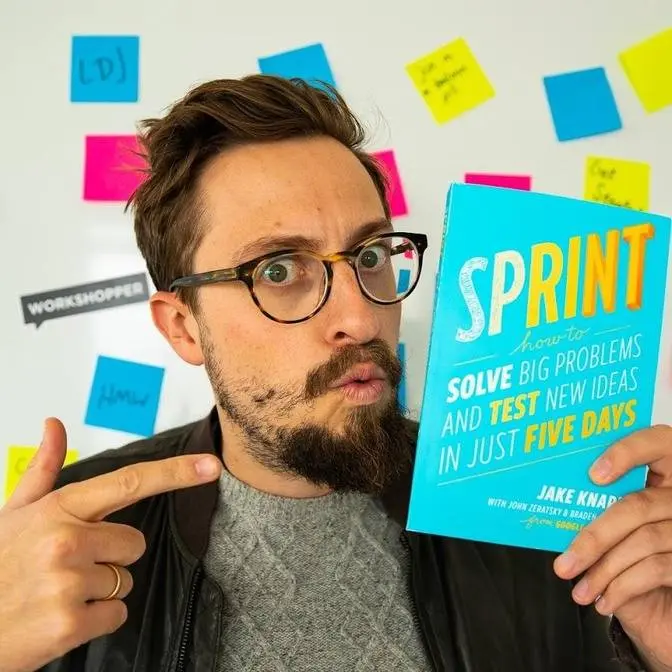
with you is called sprint by Jake Knapp
this book was written by Jake nap while
he was working in Google Ventures so
this process came out of Google and it's
a great process for solving big problems
so the full name of the book is sprint
how to solve big problems and test new
ideas in five days so it's a great way
to take all of the design process and
condense it into five days you go
everything from understanding the
challenge to coming up with alternatives
and prototyping and
saying all within one week and we're a
big fan of this process at agent smart
in fact we use it with our clients all
the time we only do projects following
the sprint methodology and it's a great
process for you learn if you're just
starting out in design so those were my
six key steps for going from a complete
beginner to someone who can get a UX
design job in a short amount of time and
when I say short I mean like six months
to a year because it took me more like
three to four years to make this
transition and I really wanted to make
this video to condense down the
essentials for you so you can get
started quickly all you need to focus on
is showing up every day doing the work
and you'll get a job in UX design before
you know it I hope you found this video
helpful please subscribe and hit the
bell icon we put out videos on UI UX and
product design every week so make sure
not to miss out on these and check us
out on LinkedIn for more articles and
daily tips on product design and UX
design if you have any questions please
let me know in the comments and I'll
make sure to get back to you and let me
know also which step or which lesson
resonated with you the most or excited
you the most that's also really helpful
thank you so much for watching and see
you next time
hi in this video I'm gonna and my
biggest tip for you in this case is soup
and my tip for you in this case is to
and the best thing you can do
[Music]
a man whatever I feel in this position
please know that always a very when
you're feeling like you're stuck
somewhere or you're not sure what to do
next and the last book is called sprint
so sprint believe it or not I didn't
have anything to say okay so hold on I
think that the title is actually good
[Music]
you